My 2025 app audit: less mindless scrolling, but more mindless listening

Background: This is a post I put together as part of an annual ritual I started in 2023, documented in 2024, and continued in 2025: the smartphone app audit. This is where I use a phone upgrade or phone data migration as a moment to reflect on what apps I have installed on my phone and how I use them — to try to do better the next year. Since 2023, I’ve also been using AI/LLM models as a way of auto-categorizing my apps from screenshots to identify the time-suckers, a procedure I document below.

This year’s audit happened to come near the end of the year, so the post has a feeling of a New Year’s Resolution. In particular: I’m doing a good job of staying away from mindless scrolling in the shape of short-form video content (e.g. TikTok and its various clones), but I’m doing a less-good job of staying away from “mindless listening” — that is, I’m letting podcasts, and similar “background audio content” slip into all the empty/quiet moments of my day, and I’m not liking that change.

I’m now considering whether to uninstall ALL audio apps from my smartphone — altogether. Last year, I deleted Pocketcasts from my phone for this reason. This year, I deleted Spotify, as I discovered I had inadvertently let it take on the role Pocketcasts did — that is, putting podcasts in my ear as background noise nearly every day. Maybe it’s time to retire the earbuds for awhile.

The post also mentions a new tool I’ve been using for a few months, ScreenZen, which I heartily recommend. I only use it on Android (Google Pixel 10 Pro) but supposedly it works just as well on iPhone. Introduces a little friction into my least favorite (but most addictive) apps to let me be more mindful about not using them too much. This has been handy to limit my usage of Instagram, Reddit, YouTube, and various premium news websites — that is, use cases that are valuable to me, but only in small doses.


In 2024, I wrote about my smartphone app audit. I did it again this year, this time upgrading from the Pixel 8 to the Pixel 10 Pro.

Last year, I used a new phone as a chance to ask myself, what apps do I have installed, and why?

In particular, my goal was to remove the apps from my life that are time wasters and pure distractions.

Continue reading My 2025 app audit: less mindless scrolling, but more mindless listening

PX: from laptop to cloud cluster within seconds

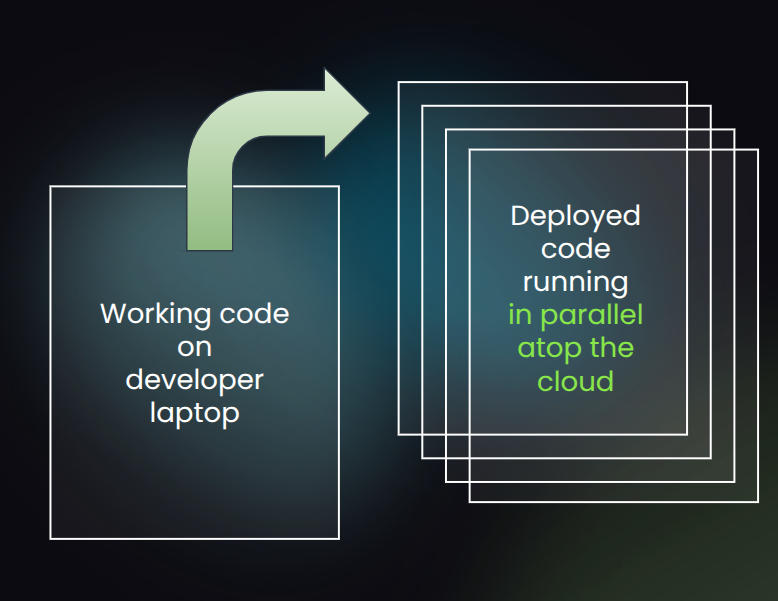
For years, every backend software engineering team I worked with struggled with one unavoidable bottleneck: turning working local code into live production reality.

Running and debugging your code in the cloud was always slow, brittle, complex, and confusing. Often, it required total code rewrites into sophisticated frameworks to get the code to even run at all in the cloud environment.

PX is our attempt to finally fix this widespread pain.

After years of watching talented people struggle with this pain, I realized something important: the cloud had matured, but our day-to-day tools for wielding the cloud hadn’t.

This matters because so much of what we build today depends on the cloud, yet the gap from working software to deployed cloud system has only grown wider.

PX aims to close that gap. And I’m happy to say that for the last few months I’ve been working with a small team of former colleagues on this, which is “startup #2” for me. Building the PX platform up from first principles has been fun. And I already see huge potential in what we’ve built. I’m ready to share a little bit about it publicly.

Our new company, PX, helps developers go from laptop to cloud cluster within seconds.
If you’re a backend engineer, read on. If not, you can still check out our website at https://px.app and share this post or the site with your team, where they can learn more.

The rest of this post will go into some of the technical details of how PX already works today, including how to build your first PX cluster and run your first PX cluster job — all the while using your favorite programming language and your existing cloud environment. The last section of the post will cover how we plan to expand PX’s use cases over time, moving from one-off (batch) workloads to all other backend cloud cluster workloads.

Continue reading PX: from laptop to cloud cluster within seconds

Hypernormalization and distrust

I’m fortunate that I got a high school education in a US public school system built during a period of post-WW2 abundance — when we invested in the future.

I feel doubly fortunate that I attended NYU when a college education was seen as a universal good.

I remember that post-9/11 politics in the US was dark. If you think about it, 2001 was 9/11 and 2008-2009 was the Great Financial Crisis. With the Iraq War in between (and after). That was a dark period for the US.

And yet, when I look back at that time, I was at my most idealistic.

One way I could remain idealistic is that the US, for all its problems, maintained two great principles:

  • individual freedom — the right to make one’s own decisions
  • free speech — the right to speak freely, especially to dissent

Both of these are supercharged by education.

The way I see it, these rights are fundamental. Whether you’re a politician, a government agency head, a corporate executive, a wealthy bigwig, or just any old fellow citizen, if you try to suppress my individual freedom and my free speech, you are out of line.

And I feel strongly about the converse, as well. Which is that the best of our politicians, our government agency heads, our corporate executives, they try to encourage individual freedom and encourage free speech.

That means encouraging those around you to speak out their mind.

This does lead to one tension that has to be resolved. How to handle the people who use their individual freedom and free speech rights to try to suppress the individual freedom and free speech rights of others? The answer, here, is pretty clear, to me. That’s out of line, too.

Life goes on.
Illustration by Glenn Harvey of The Guardian, as part of a series of illustrations in this article.

Hypernormalization is a term that refers to a strange feeling that every institution is failing, yet life goes on. This is how I felt after 9/11 and the Great Financial Crisis. It’s also how I feel now. Idealism was needed then. And it’s needed now.

Continue reading Hypernormalization and distrust

My tricks and accessories for working ergonomically on a laptop while on the go

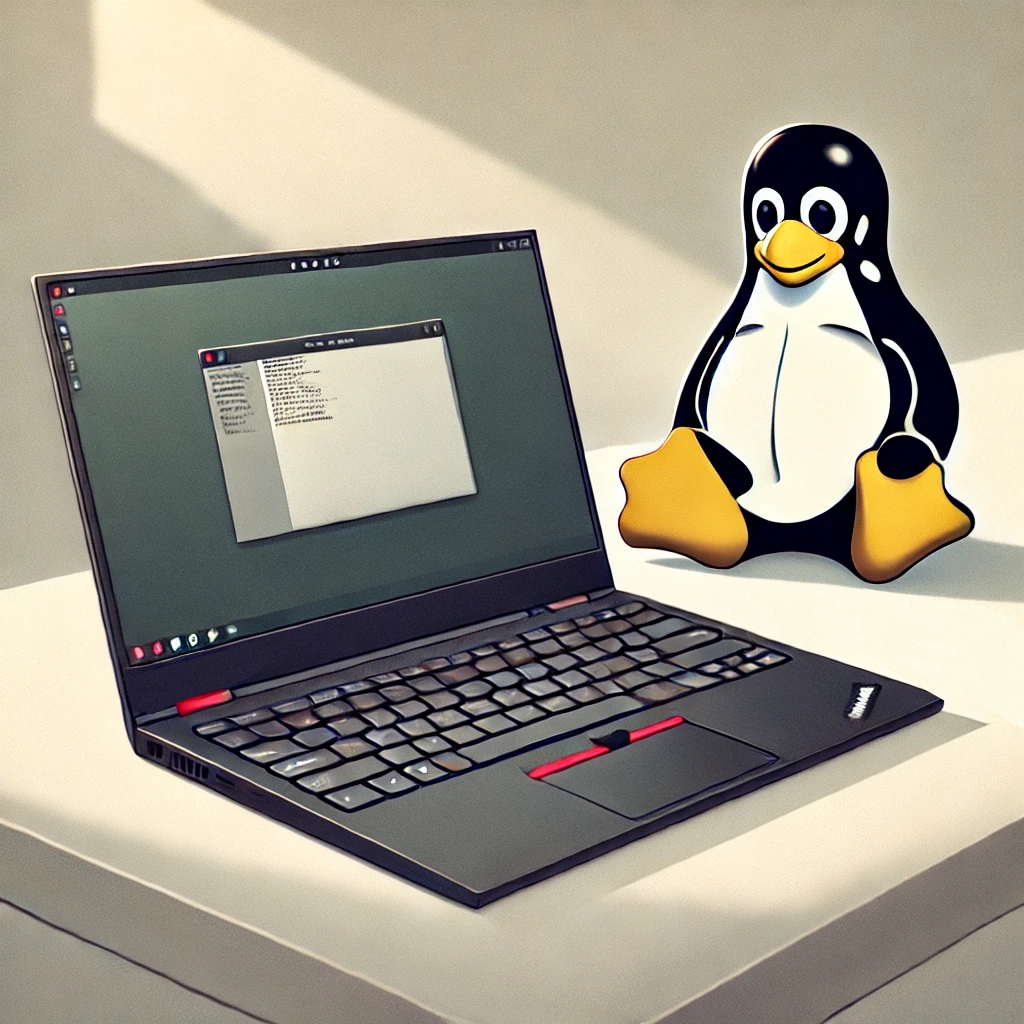
In my last post, I discussed how I upgraded to a Lenovo X1 Carbon Gen 11 laptop (rtings.com review) as my primary Linux workstation. For years, I’ve worked from my Linux laptop (usually a Lenovo X1 carbon) on the go.

I’ve been spending more time recently working on the go, outside of my office, for various reasons. That made me realize: I never did a post about how I make sure I keep some good ergonomics even when working from cafes, hotels, libraries, outdoor parks, and so on. Well, this post will remedy that!

Making a laptop feel nice on the lap

It’s in the name! Laptops are meant to be used from your lap. At least, in theory. But, laps create all sorts of issues for laptops:

  • Heat. Even if your laptop stays cool, small amounts of heat from the machine will be lost to your upper thighs. It’s just uncomfortable.
  • Stability. A laptop is meant to be totally stable while you type, but your lap isn’t a totally even surface.
  • Ergonomics. The ideal height and distance of your arms/hands/wrists to the keyboard should be a little further away from you than your immediate lap. But the farther away your laptop is, the less stable it feels.

Luckily, all of these issues can be solved relatively easily, but in a counter-intuitive way. Here is the solution:

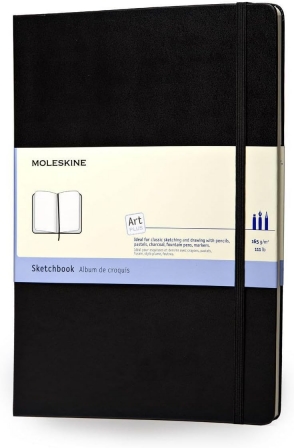
What is that? It’s a Moleskin Art Sketchbook, Hard Cover, Style: Book, Size: A4 (8.25″ x 11.75″), 96 Pages. (Amazon link) This is a lovely notepad — really, a sketchbook meant to be used by artists. But it has a hard cover which is the size of an A4 sheet of paper (slightly larger than letter size paper). It’s also pretty much exactly the size of a 14-15″ laptop. You rest your laptop on this, and it allows you to place your laptop on your lap and instantly fixes heat, stability, and ergonomics issues.

What you’ll also notice is that by raising the laptop a little and having a stable surface underneath it, you feel more comfortable balancing your laptop farther from your body (e.g. approaching your knees), which makes typing on your laptop even more ergonomic.

What’s more, it’s easy to slip this sketchbook in your backpack right next to your laptop to provide extra protection when traveling with it. And, you can still use it as a pen-and-paper notepad! I also love that its large-format sheets which are unlined, and thus are perfect for diagrams or interface sketches that you can then take a photo to scan digitally.

I’ve used this trick for so many years, but never see anyone else doing it, so I figured I’d share.

Continue reading My tricks and accessories for working ergonomically on a laptop while on the go

Linux is free and your mind is valuable

One of my favorite old Linux jokes is, “Linux is free… if your time is worthless.” This quote is possibly adapted from a jwz interview dating back to 1998. In it, he said:

I think Linux is a great thing, because Linux is an alternative to [major operating systems], and because, of all the operating systems that are at all relevant today, Unix is the best of a bad lot. […] As we all know, Linux is only free if your time has no value, and I find that my time is better spent doing things other than the endless moving-target-upgrade dance.

That said, I’ve run Linux dating back to my earliest days studying formal operating systems, when I did it mainly so that I’d have access to vim, shells, a solid gcc toolchain, and good x86 hardware emulation and virtualization tools. Somewhere along the way, though, I made it a point to make my day-to-day computing, if not completely imbued by the open source movement, at least “keyhole accessible” to its thriving core, which continues to be Linux. So, for me, as a point of pride, it has been Linux on the desktop, Linux on my smartphones (that is, Android Linux), and Linux on my smart TVs (that is, webOS). As well as Linux in the obvious places, like my cloud VMs, my Raspberry Pi, my physical server, etc.

I’m not a purist, though. I still use plenty of proprietary software in my life. And plenty of proprietary hardware, too. To stay connected to the world of Apple, I keep an iPad running iPadOS and a Mac Mini running macOS. To stay connected to the world of Microsoft, I keep a dual-boot’able partition for Windows 11 Pro. But I’d say 90% of my computing happens on some Linux variant, and that makes me feel good about having a more direct relationship with computing, where I can always peel back some layers of the onion as needed.

My latest was to shift from a very-very old laptop (my trusty Lenovo X1 Carbon Gen 8) to a not-quite-so-old laptop (a Lenovo X1 Carbon Gen 11). I’ve been sticking with Lenovo as my Linux laptop for awhile now, covered in past posts like “Speed & lightness” and “Lenovo and the new Linux desktop experience”.

Linux is free to run on your laptop

By doing a little research beforehand, I got a model off the Lenovo outlet store with a screen, webcam, and Intel architecture that is well-supported by Linux (summary: avoid MIPI webcam and avoid mobile WWAN). Specifically, it runs perfect with Ubuntu 24.04 LTS out-of-the-box. The only “tweak” I had to make was a workaround for thermald which was erroneously refusing to start on my CPU architecture — the fix was a rather easy systemd invocation and is described here.

In typical Linux “rabbit hole” style, learning a little bit about thermald (with the help of the source code reading and summarizing features of ChatGPT4 projects, incidentally) made me better understand how my laptop approaches battery and cooling performance.

Another change that is more from the world of security is learning about SecureBoot + TPM, two semi-controversial changes to the laptop hardware landscape that Linux didn’t support well until somewhat recently. More on this available in this Twitter/X thread. So, yet again, in fortuitous Linux rabbit hole style, I learned something about modern “security” hardware I wasn’t paying close attention to beforehand.

Continue reading Linux is free and your mind is valuable

Linux backup workflow for hackers with restic, rclone, Backblaze B2

In 2017, CrashPlan was one of the most popular full-computer offsite/cloud backup tools for consumers. It had millions of paid users, usually paying around $10/month for a few terabytes of offsite storage.

But then… “On August 22, 2017, Code42 announced they were shutting down CrashPlan for Home, effective in October 2018. They were not accepting new subscriptions but would maintain existing subscriptions until the end of their existing subscription period, at which point the backups would be purged.”

Picking a backup tool is hard. If you outsource your backups to a commercial entity, you have to be convinced that entity will stand the test of time — and won’t undergo dramatic business model shifts — since, after all, your backup scheme is supposed to follow you around for life.

This is an ideal software category in which to choose open source software — plus a highly durable, interoperable, and financially-well-supported cloud storage option.

Thankfully, as of 2018 or so, I have this open source software + interoperable cloud storage solution working on my main Linux development machine. I’ve been using it for 5+ years and since I’m very happy with it, I’d like to share it with you all here.

The restic logo sets the tone for how you should think about backups!

As a hacker (that is, as a playful programmer), you inevitably have important files on your desktop that don’t get automatically backed up some other way. Yes, you probably have your source repos backed up in GitHub or Gitlab, and you probably have your phone backed up in Apple iCloud or Google One. Maybe you are even organized enough to have digital copies of your personal records, usually in DOCX or PDF format, in Dropbox or Google Drive, assuming you trust the data privacy policies of these providers.

But you still have millions of other files on your desktop computers that include: artifacts not checked into source control (or not yet pushed to remote); operating system and application configuration; photographs and videos from your non-phone camera gear; screencasts and Zoom/GMeet video recordings; paranoia-driven backups of data exfiltrated from cloud providers like Gmail and Google Drive; and so on. Perhaps you even have sensitive/important medical or tax/financial records that you’ve been nervous to stick in a cloud data store.

This post will cover a setup that works well in practice, while also having some interesting technical properties worth discussing.

Continue reading Linux backup workflow for hackers with restic, rclone, Backblaze B2

Good Python Software

I’m glad to say that the last few months have been a return to the world of day-to-day coding and software craftsmanship for me.

To give a taste of what I’ve been working on, I’m going to take you on a tour through some damn good Python software I’ve been using day-to-day lately.

Python 3 and subprocess.run()

I have a long relationship with Python, and a lot of trust in the Python community. Python 3 continues to impress me with useful ergonomic improvements that come up in real-world day-to-day programming.

One such improvement is in the subprocess module in Python’s standard library. Sure, this module can can show its age — it was originally written over 20 years ago. But as someone who has been doing a lot of work at the level of UNIX processes lately, I’ve been enjoying how much it can abstract away, especially on Linux systems.

Here’s some code that calls the UNIX command exiftool to strip away EXIF metadata from an image, while suppressing stdout and stderr via redirection to /dev/null.

Continue reading Good Python Software

The smartphone app audit

I recently upgraded from a Google Pixel 7 to a Pixel 8 phone. Nothing earth shattering about this upgrade. Incremental. “Performance smartphones,” as the DOJ recently called iPhones and high end Androids, have leveled off in core functionality.

The Pixel 8 is slightly smaller than the Pixel 7, which makes me happy, as I treat my phone as a utility device, not a content or gaming device. It has small upgrades in battery life, screen, and connectivity. The most interesting upgrade is a USB-C desktop display mode for external monitors, which I’m excited to try out for Google Photos, for reviewing hi-res photos on a bigger screen.

When I am working at a laptop-docked ergonomic desktop computer setup during the day, I like the idea of my phone being like a second desktop (with an actual monitor, keyboard, and mouse!) rather than this buzzing distraction in my pocket. This is all a part of my long desire to resurrect the read-write creative abilities on what were, for many years, read-only passive consumption devices.

The biggest change for me during this smartphone upgrade, though, was that I decided to do a smartphone app audit at the same time.

That is, I wanted to figure out, what apps do I have installed, and why?

And, in particular, can I remove the apps from my life that are time wasters and pure distractions?

Continue reading The smartphone app audit

Core Python

When I describe my programming background these days, I say that I code “primarily in Python, JavaScript, Clojure, C… and Zig!” I put Python first in that list for good reason.

This is a post about the core Python language, but also the ways in which Python is evolving its single-core and multi-core CPU performance.

Python has been my go-to programming tool for a long time. When I started to build out my last company and shipped the production core of its product, Python 2.7 had just stabilized, creating an excellent “core language.” This is a language that I truly respected, as evidenced by my style guide. And, as I discussed in my Python technical book review round-up, this core language was best described by David Beazley in the first half of his Python Essential Reference book, which was also turned into an excellent standalone volume (which includes Python 3.x coverage), Python Distilled.

Many, many useful open source projects, companies, and projects were built atop that Python 2.7 core foundation of a language. Its community truly flourished.

Continue reading Core Python

Putting Your Media on a Diet

When you type an address into your web browser and are brought to a web server, a lot of decentralized magic happens within the span of a few seconds. Through the web, we have an infinite media available to us.

It as though you have a beautifully-maintained bookshelf and run your finger along the spines of the books, and then pluck out the one you want. But the sci-fi part, which is more science than fiction today, is that the bookshelf has millions of virtual entries and the information you want is delivered to you instantaneously. Once this virtual book is delivered (once a website is loaded), it can be frequently refreshed with real-time updates, and it exists in a form that can be navigated, searched, read, spoken, heard, shared, saved-for-later, or even automatically analyzed and summarized.

This is a lot of power for each individual to wield.

That is a lot of text to choose from, with which you can train your brain.

And that is even if you put aside the world of paid digital books via Amazon’s empire of Kindle. By the way, this Amazon empire need not cost money to you in the US, as you can often gain (adequate) free access to it via your local library on the Libby app.

So, one thing is for sure: there are a lot of words to choose from when deciding what to read. But this also means that an individual faces a paradox of choice when they click into that blank address bar in their browser.

Will they, like so many others, ignore the address bar and the browser altogether? That is, despite having the “infinite bookshelf” at their fingertips, will they, instead, hit an app shortcut to one of the major passive content delivery platforms, like Facebook, YouTube, Instagram, or TikTok?

Recent research from Pew suggests that major passive-consumption mobile apps are used by a majority of Americans, and, what’s more, that usage of the most video-forward of these (YouTube, Instagram, and TikTok) is nearly universal among people 18-29 years old. As for teens, 9 out of 10 of them are online (presumably via smartphones) every single day, and nearly 5 out of 10 are online “almost constantly.” This comes from a 2023 report.

If you read between the lines of these two reports, what comes into a focus is a culture of individuals addicted to video streaming devices in their pocket, filling inevitable moments of boredom with hastily- and cheaply-produced sights and sounds, rather than retreating to the world of written words. And, unsurprisingly, people are reading less.

Continue reading Putting Your Media on a Diet