
For years, every backend software engineering team I worked with struggled with one unavoidable bottleneck: turning working local code into live production reality.
Running and debugging your code in the cloud was always slow, brittle, complex, and confusing. Often, it required total code rewrites into sophisticated frameworks to get the code to even run at all in the cloud environment.
Our new startup, PX Systems, is our attempt to finally fix this widespread pain. This month, we publicly unveiled a new command-line interface (the PX CLI) which can take working code in your programming language and get it running on freshly-provisioned cloud hardware in your cloud environment.
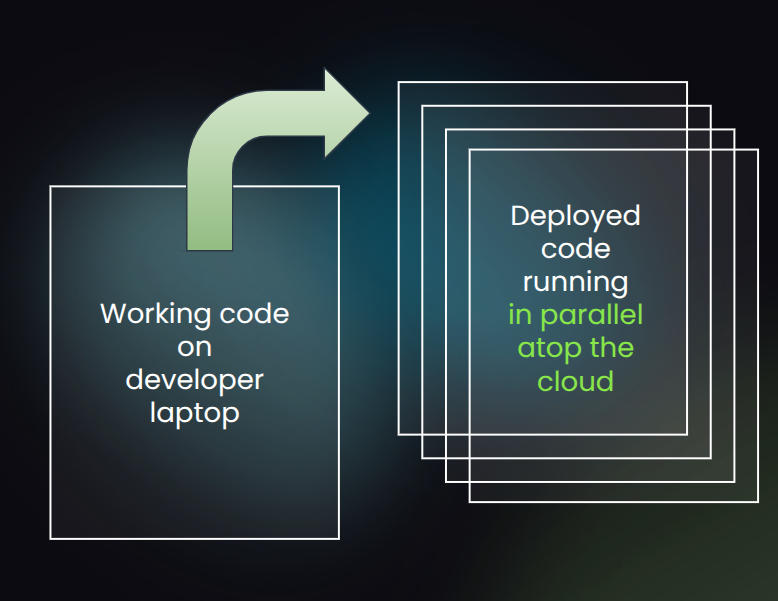
For years, we watched talented people struggle with this pain. The cloud had matured, but our day-to-day tools for wielding the cloud hadn’t.
This matters because so much of what we build today depends on the cloud, yet the gap from working software to deployed cloud system has only grown wider.
We aim to close that gap. And I’m happy to say that for the last few months I’ve been working with a small team of former colleagues on this, which is “startup #2” for me. Building this critical dev tools platform up from first principles has been fun. And I already see huge potential in what we’ve built. I’m ready to share a little bit about it publicly.
Our new company helps developers go from laptop to cloud cluster within seconds.
If you’re a backend engineer, read on. If not, you can still check out our website at https://px.app and share this post or the site with your team, where they can learn more.
The rest of this post will go into some of the technical details of how the PX CLI already works today, including how to build your first cluster and run your first cluster job — all the while using your favorite programming language and your existing cloud environment.
The last section of the post will cover how we plan to expand the PX CLI’s use cases over time, moving from one-off (batch) workloads to all other backend cloud cluster workloads.
Root-striking the issue
I spent more than a decade as a CTO for a real-time analytics software company (Parse.ly) whose backend engineering team shipped rock-solid distributed systems built with Python and deployed atop commodity cloud Linux VMs. Our company’s growth corresponded with the rise of mature public cloud data centers like Amazon Web Services (AWS) and Google Cloud Platform (GCP).
One of my toughest technical projects was when we “shipped the second system”, which involved developing deep expertise in open source distributed systems like Elasticsearch, Cassandra, Kafka, and Spark — and how we got it all to run reliably, cost-effectively, and at-scale in AWS. But, as I described in that post, getting our business logic into the distributed cloud environment required herculean feats of systems engineering.
A few years ago, Parse.ly was acquired by Automattic, the creators of WordPress.com. I spent a couple years as a head of product + engineering at Automattic. From my time as an engineering lead, I’ve witnessed backend teams face similar development challenges in deploying their distributed systems. When I got to take a step back from the cloud architectures I helped design — and the architectures of many other backend teams — something clicked for me.
I realized that the cloud market had changed. There was an inflection point in how backend architectures could be designed — and simplified. Through this lens, I came to understand the common complexity spirals as newly solvable. Specifically: I realized they could be solved a layer down.
And then last year, I realized the entire software development lifecycle had changed, due to Claude Code. The world needed cloud execution for the AI coding era.

Our goal with PX Systems is to “root-strike” these issues. Our mission is to deliver to backend developers the joy they deserve when shipping their software to the cloud.
Since this is a new daily tool for programmers, we recognize it has to fit into existing workflows. Thus the user experience is centered around a command-line interface with self-explanatory subcommands like px cluster up, px run, and px submit.
I’m really excited about it because it’s a tool and a product I always wished I had — and always wished I could give to the engineering teams I led or advised.
And now, it’s also a tool that my AI agents, like Claude Code, running at my terminal, are eager to use.
This work builds on my past experience as a CTO. But its real inspiration comes from tools like git and terraform, tools that completely transformed backend software practices in the last decade.
In much the same way that git is a programmer’s daily tool to manage code at dev time, px aims to be the programmer’s daily tool to manage code at cloud runtime.
What does that mean? Let me explain.
Building your first cluster
Let’s say you already have px installed on your laptop and you’re in a local checkout of a git repository for a Python project. You could use:
$ px cluster up CLUSTER_NAME
This will build you a cloud cluster. What kind, exactly? That depends on your px.yaml file. Here’s how it looks if I just want a 2-node cluster to bulk process a bunch of JPG images:
$ px cluster up jpg
<px> Reading [px.yaml]
<px> Connected to your [Google Cloud Platform] account. ✅
<px> Cluster up [2 nodes x 4 cores = 8 cores]. ✅
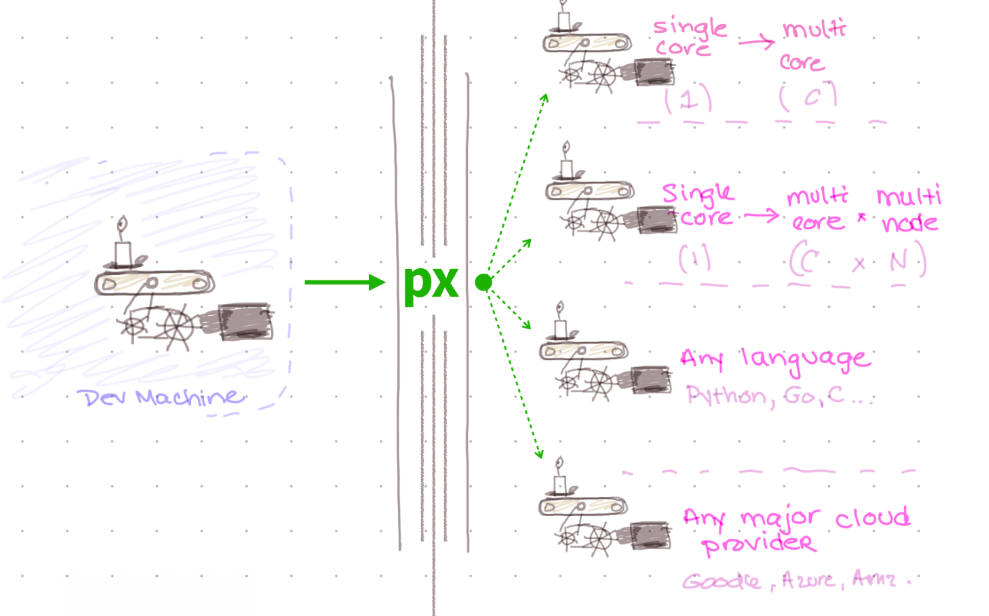
Under the hood, px uses an up-to-date cloud pricing database. This includes the tens of thousands of hardware instance types. But rather than asking for specific hardware instance types, you can just specify some basic requirements in px.yaml — such as number of cores, amount of disk/memory, preferred region — and px will use that guidance to find you the best/cheapest cluster options. Then it’ll rapidly build you that cloud cluster, network it up, and track the estimated per-minute/per-hour operating costs.
Much like git, px doesn’t care about your programming language or framework. It supports everything that runs on a Linux server. And it also directly supports all of the top public clouds. During our private beta period, we are shipping with direct support for GCP, but AWS support will follow closely behind. Then, Microsoft Azure and DigitalOcean will round out the initial public cloud support.
Running your first cluster job
Let’s say the local Python project I’m working on has a single Python script as its entry point. It’s just called jpg.py. It’s a command-line tool that takes JPG filenames as input and produces converted JPEG XL files as output.
As a backend programmer, you’ve probably written tens (or hundreds) of such programs across different programming languages. This is also the kind of simple command-line program that a modern AI/LLM tool could generate with ease.
Here is a sample invocation:
$ python jpg.py data/input.jpg
Processed 1 image(s) in 0.5s
How would I run this Python CLI program on my px cloud cluster across hundreds/thousands of JPG images? Simple as this:
$ px submit 'python jpg.py' --cluster jpg --args-file 'images.txt'
<px> Reading [px.yaml]
<px> Submitting 'python jpg.py' job to PX cluster [2 nodes].
[...]
Processed 1000 image(s) in 14.7s
This instantly schedules a px job on your cluster and runs it. It feels just like running the program locally: the script’s output streams right back to your terminal.
Under the hood, px is shipping your code to the cluster, running it in a highly parallel way, partitioning the inputs, and multiplexing (muxing) the terminal outputs.
Your program doesn’t call cloud APIs to access those files, however. Your program just operates on files! Your cloud storage is transparently and automatically mounted as a filesystem mount point in your cluster node. More on this architecture decision in a future blog post. (For some simple use cases, operating directly on streaming lines and bytes over stdin is also an option.)
The input JPG files come from cloud storage — in this case, Google Cloud Storage (GCS). We’re starting with GCS, since it’s very easy to spin up a GCP account and get free credits for hobby projects (with your Google login). But the same pattern extends naturally to Amazon S3, Azure Blob Storage, and DigitalOcean Spaces, and we’re tackling AWS next.
Optionally, when you run a PX CLI job on your cluster via authenticated px commands, you also get instant debugging and observability by way of a real-time dashboard. This dashboard is securely hosted at https://px.app, where you can now find a website describing the core offering.
If you’re a backend engineer, by now, you probably see where we’re going.
Backend engineering can be simple and joyful
We’re trying to make the cloud development experience as simple for backend coders as it has been for frontend coders/designers thanks to tools like Vercel, Netlify, Replit, and the like. But we understand that backend engineers want 100% transparency and full control over their deployed systems. Thus, our design is very different.
We are not suggesting the adoption of an entirely new cloud. We know that’s a non-starter for many/most backend engineers. So though we sometimes describe this new platform as “Vercel for backend,” our design is inherently cloud independent and open source friendly, which are values we know are important to backend engineers. And values that are important to us!
Thus px feels a little closer in spirit to tools like git and terraform (or OpenTofu, these days). Like git, it is meant to be a daily developer tool, executed just as frequently as you execute your code to test and debug it. Like the original vision for open source terraform, it is meant to be 100% cloud independent, relying only upon the availability of certain cloud primitives. Among these: Linux, VMs, VPCs, ssh, spot instance marketplaces, and cloud object storage.
The platform shipped by PX Systems is also quite different from some of the other “hosted backend” offerings on the market (e.g. Firebase, Supabase) because its goal is to support “bring your own cloud.” That is: the px command runs on your development machine and on your cloud nodes, it works with every programming language, and it doesn’t require you to rewrite your code in any way. The basic rule is, if you can run it as a command or Linux process locally on your machine, px can run it on a cluster of any size and shape.
It’s thus better to think about this as a “high-velocity backend shipping platform” for arbitrary backend code projects. It’s not a database. It’s not a framework. It’s true infrastructure that fades into the background. It is a transparent layer below your code — but above your public cloud hardware.
The goal is to let you keep your code simple. To let you test your code locally. To let you debug your code ergonomically. To let AI agents help you write your code, test your code locally, and then debug your code for you in a cloud environment. To give you a way to get your code shipped, running, and instrumented on just-in-time provisioned cloud clusters with ease.
For simple backend use cases, the PX CLI could be used instead of AWS Lambda or GCP Cloud Run Jobs. Those are great “serverless” products, but they are limited to only a single cloud, by definition. They don’t leverage your existing Linux debugging skills. They don’t allow for easy local development workflows. Nor do they allow under-the-hood production debugging. They force you to program against a proprietary API and runtime environment. Those runtime environments are quirky and limited in various ways. Your AI agents have a hard time reasoning about them — because they hide the hardware and operating system underneath!
The PX architecture, by contrast, takes advantage of the weights and biases in all the foundation models that make them so capable already — they can write one-off scripts, execute shell commands, and introspect the Linux runtime environment via their superhuman knowledge of terminal commands and the operating system. PX bridges the gap by giving the AI agents the global view they need of the cluster, the ability to deterministicaly provision cloud hardware at low cost, and to easily reason about its execution from local to staging to prod.
What about hand‑rolling a solution to this? Most backend teams eventually end up in the same place: a couple of special cron boxes, a maze of old bash scripts, and a tangle of cloud services wired together in ways nobody wants to touch anymore. It works… until it doesn’t.
At that point, the default answer is usually “let’s do some platform engineering.” Thus you get a shared Kubernetes cluster, a pile of YAML, and a small InfraOps/DevOps team acting as translators between backend engineers who say, “I just want to run this code!” and the reality of “This is how our cluster works.” That model can keep production up. But all the complexity and gatekeeping takes away from a backend engineer’s ability to ship.
Our design already works with your backend stack. We want to help backend engineers ship code every day. Ship code every minute and every hour, even!
As a company, we are 100% focused on backend coder ergonomics. We want to make your backend cloud developer experience feel awesome. The way local development feels.
Shipping your production backend app should have the same rapid “build – test – debug” loop that you get when writing small programs for Advent of Code in a flow state!
The PX CLI also lets you (and your AI agents!) reuse Linux debugging skills. Because it gives you direct access to cloud hardware via Linux VMs. And direct access to nodes. Your code runs on those VMs in a way that is easy for you to understand and very similar to how code runs when it is tested locally on your laptop.
Thanks to the design, however, there is more ability to leverage cheap instances (e.g. spot instances), to parallelize across data, and to survive/understand process crashes.
We want “from laptop to cloud cluster within seconds” to be the daily mantra of the px tool, the associated dashboard, and the overall developer experience. We hope to blaze a whole new path in the space.
Where we are and where we’re going
Right now, the PX CLI only supports one-off jobs (aka batch jobs). Because: you have to start somewhere. But already that covers quite a lot of use cases. You can use the PX CLI to bulk convert images or videos. To process piles of data files to transform them or load them into a data warehouse. To implement a web crawler. And many other humdrum and sophisticated software use cases besides.
We plan to add scheduled jobs (aka cron jobs) soon, which will cover many more use cases. And then streaming jobs after that. Once we have streaming, I believe the platform will cover pretty much all backend programming use cases. Which then means it can be a unified cloud provisioning and execution engine, regardless of the shape of your code.
For this private beta launch, it only supports GCP. But it’ll support other clouds soon, starting with AWS. We want to build a community out of all backend programmers, regardless of language or cloud. There is a huge stack of common problems to solve. We also want to support the porting of systems and subsystems between languages, something much easier in the era of AI/LLMs.
So, this is just a start. But it could lead to something truly big!
There are between 25M and 100M+ self-described developers in the world today, depending who is counting. And many more are self-describing as developers thanks to the ease of generating working code from a natural language spec, thanks to AI/LLM tooling. The lion’s share of that code has to ship to the cloud if it’s going to see the light of day. I hope we can help.
What’s more, terminal-based agentic AI/LLM systems, such as Claude Code, need a reliable, deterministic, ergonomic tool that can provision cloud resources and run any software on those cloud resources. The PX CLI can fill that gap.
I’m quite excited about it. And so is the small and talented core engineering team we’ve built around it. This includes Nelson Monserrate and Cody Hiar, two amazing engineers who I’ve known and worked with for years. I also got an excellent design assist from Marguerite, another talented former colleague from my last startup.
Feel free to reach out, sign up for our private beta waitlist, and we’ll help you make backend programming a joy again — whether for yourself, your company, or your next greenfield project.
Check out https://px.app and let us know what you think. And if you have questions, shoot an email to [email protected].
Happy hacking!
Acknowledgements: Thank you to Keith Bourgoin for reading a prepublication draft of this post and providing excellent detailed feedback that improved it before publication. Thank you also to Nelson, Cody, and Marguerite for reviewing earlier drafts.